

When you set up a new laptop or desktop computer, installing a reliable productivity suite is always your primary requirement. You need dependable programs to type documents, manage household financial spreadsheets, and assemble presentations. For decades, Microsoft Office has remained the undisputed global standard for these essential office tasks.
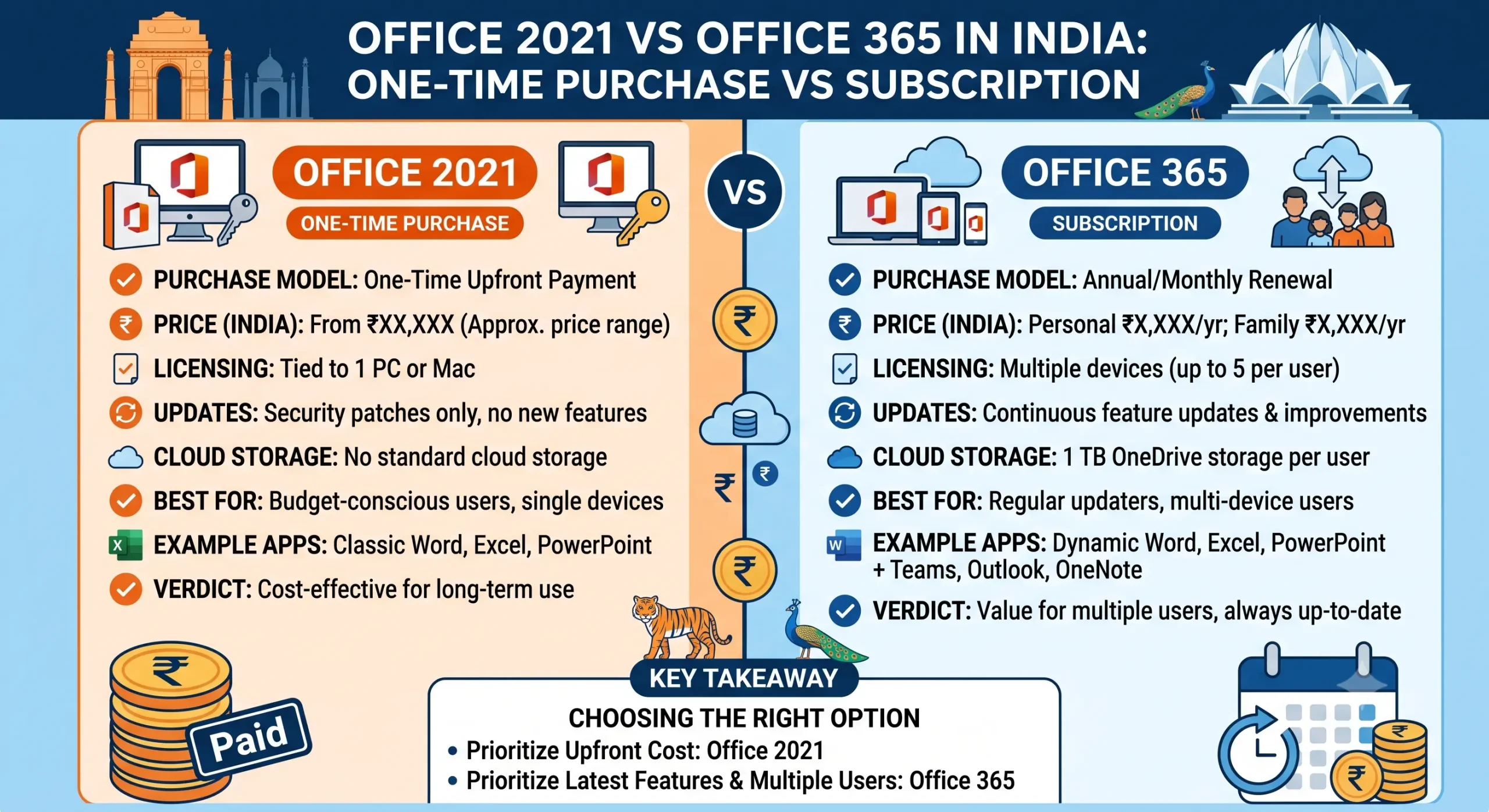
However, picking the right version has become quite confusing for the average buyer. Microsoft actively promotes two completely different licensing models in the Indian market. One demands a recurring rental fee, while the other offers a traditional one-time ownership path. Evaluating office 2021 vs office 365 in india requires a clear look at the long-term software costs.
Before saving your payment card information on subscription portals, you can calculate your long-term software overheads using our free AI Subscription Cost Calculator to see the real lifetime impact.
Understanding the Standalone Model: Office 2021 Lifetime Licenses
Office 2021 represents the traditional perpetual software model. You pay a single upfront price, download the suite directly to your machine, and own that specific version forever. There are zero automated monthly renewals or hidden recurring fees on your credit card statement.
This edition includes all the core applications you use daily, such as Word, Excel, PowerPoint, and Outlook. Once you input your retail license code, the software functions fully offline without needing an active web connection. The license remains valid for the entire functional lifespan of that specific computer hardware.
The only real limitation is the lack of feature updates. A standalone version preserves its exact launch feature set. If Microsoft introduces a brand-new design or an advanced feature two years later, your offline installation will not receive it. However, it continues to receive critical system stability and security patches automatically.
Understanding the Rental Model: Office 365 Subscriptions
Office 365 operates on a modern software-as-a-service architecture. Instead of buying the utility once, you are essentially renting the applications from Microsoft on a monthly or annual subscription pattern.
This model provides continuous cloud-based benefits. You always run the absolute latest software version, meaning new updates and tools install automatically the moment they launch. A single premium subscription also allows you to log in and install the apps on up to five separate devices simultaneously, covering your phone, tablet, and family desktop under one account footprint.
Furthermore, it includes a massive 1 Terabyte allocation of OneDrive cloud backup space. The major risk with this setup is the recurring cost block. The moment you stop paying the subscription, the software moves into a read-only restricted mode, locking your ability to edit documents completely.
The Financial Comparison Over a Three-Year Window
To see which model makes sense for your bank account, you must calculate the compounding expense over a multi-year horizon. A standard consumer subscription costs a set rupee amount every single year, adding up quietly over time.
If you buy an official perpetual retail code, your investment is completely finished on day one. For an ordinary home user, freelancer, or small business owner who just needs to build standard sheets and write proposals, the features inside the standalone version are already incredibly advanced. Paying a continuous cloud rent fee often results in thousands of rupees wasted on storage features you might never actually use.
How Offline Activation Works for Standing Licenses
When you install a standalone perpetual suite, online servers sometimes face high traffic congestion, triggering a standard activation error screen. If this happens, the system displays an installation code split into separate blocks and asks you to execute phone verification.
You do not have to waste your time calling toll-free support numbers or dealing with slow automated phone prompts. You can easily paste those installation numbers directly into our free Get Confirmation ID Tool to generate your official Microsoft return activation blocks instantly without a call.
We ensure your software deployments remain fully operational without long wait times. If you want to check out genuine, verified product keys, we stock fully guaranteed configurations.
Browse our official catalog for a genuine Office 2021 Retail Key or check out our high-speed utility options directly at the keys-shop.in website today.
Frequently Asked Questions
Q: Will my old Office 2021 files open inside an Office 365 application?
A: Yes. All Microsoft productivity applications use the exact same underlying file extensions, such as .docx and .xlsx. Your documents remain completely cross-compatible across all versions.
Q: Can I use the phone confirmation ID tool for my Office 365 account activation?
A: No. Phone activation and Confirmation ID codes apply strictly to perpetual lifetime licenses like Office 2021 or Windows Pro. Cloud subscriptions must verify their status directly online via account login panels.
Q: What happens to my cloud files if I cancel my subscription?
A: Microsoft provides a short grace period to download your data. Once that window shuts, your cloud storage capacity drops back down to the basic free 5 Gigabyte limit, and excess files may be deleted.
Frequently Asked Questions
What are the main differences between Office 2021 and Office 365?
Office 2021 is a one-time purchase with a fixed set of features, while Office 365 is a subscription service that includes regular updates and additional cloud services.
Is Office 365 more expensive than Office 2021?
Over time, Office 365 can be more expensive due to ongoing subscription fees, but it offers more features and updates compared to the one-time purchase of Office 2021.
Can I use Office 2021 offline?
Yes, Office 2021 can be used offline after installation, while Office 365 requires an internet connection for some features.
Which option is better for businesses in India?
It depends on the business needs; Office 365 is ideal for teams needing collaboration tools, while Office 2021 suits those preferring a one-time payment.
Are there any discounts available for Office products in India?
Yes, various retailers and online platforms often provide discounts on both Office 2021 and Office 365, especially during festive seasons.

