
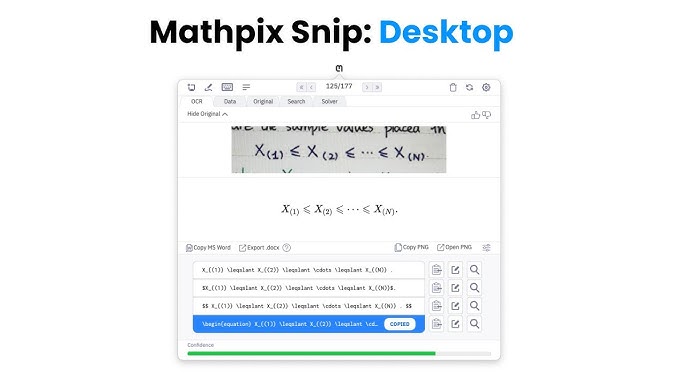

✂️ Mathpix Snipping Tool – AI-Powered OCR for STEM Content
The Mathpix Snipping Tool is an advanced OCR (Optical Character Recognition) application designed to convert images, PDFs, and handwritten notes into editable formats like LaTeX, Markdown, DOCX, and more. Tailored for students, educators, researchers, and professionals in STEM fields, it streamlines the digitization of complex mathematical and scientific content.mathpix.comAccessing Higher Ground
🔍 Key Features
-
High-Precision OCR: Accurately captures and converts printed or handwritten equations, tables, and chemical diagrams into digital formats.
-
Multi-Format Export: Supports exporting to LaTeX, DOCX, Markdown, HTML, Overleaf, and SMILES for chemical structures.
-
PDF Conversion: Transforms entire PDFs into searchable and editable documents, preserving formatting and structure.
-
Cloud Synchronization: Automatically syncs your snips across desktop, web, and mobile platforms for seamless access.
-
Mathpix Markdown (MMD): An enhanced Markdown editor that integrates LaTeX and chemistry syntax, ideal for scientific documentation.
-
Chrome Extension: Easily import PDFs from the web into your Snip collection, with features like automatic naming and metadata extraction. Web Store+2
💻 Platform Compatibility
-
Desktop: Available for Windows, macOS, and Linux.
-
Mobile: Compatible with iOS and Android devices.
-
Web: Access the Snip web app through any modern browser.
-
Browser Extension: Chrome extension for quick PDF imports and conversions.
Frequently Asked Questions
What platforms does the Mathpix Snipping Tool support?
The Mathpix Snipping Tool is compatible with various platforms including Windows, macOS, and Linux, making it accessible for a wide range of users.
How does the Mathpix Snipping Tool work?
The tool uses advanced AI technology to recognize and convert images of STEM content into editable text, streamlining the process for students and professionals.
Is there a free trial available for the Mathpix Snipping Tool?
Yes, Mathpix offers a free trial for new users to explore its features and capabilities before committing to a purchase.
Can the Mathpix Snipping Tool handle complex equations?
Absolutely! The Mathpix Snipping Tool is designed to accurately recognize and convert complex mathematical equations and scientific notations.
What is the pricing for the Mathpix Snipping Tool?
Pricing for the Mathpix Snipping Tool varies based on the subscription plan chosen, with options available for individual users and educational institutions.


Mihir Dutta –
Received my Mathpix login quickly. The account works perfectly — converting handwritten math to LaTeX is smooth and super accurate.
Roshni Bakshi –
This tool is a lifesaver for academic writing. Got full access with all export options active. Best service if you work with equations daily.
Arnav Juneja –
Mathpix account works flawlessly. I use it for scanning notes and turning them into editable math — saves a ton of time.
Pihu Raina –
Great for research and university work. The private account came fully unlocked, and the PDF to LaTeX converter is amazing.
Siddharth Jhala –
Genuine service and very helpful support. I had a question before purchasing and they clarified everything. The account was delivered within 20 minutes.
Anaya Narang –
Much better than free OCR tools. With the Mathpix Pro account, I can convert entire documents without errors — super useful for my thesis.
Vivaan Gulati –
As a math tutor, this tool is now part of my daily workflow. Full features are unlocked, and the handwriting recognition is spot-on.
Esha Bhalla –
Affordable and working solution. The login provided had everything ready — I’ve converted scanned equations into clean LaTeX multiple times now.
Kushal Deora –
Received a working Mathpix Pro account. I’m using it to digitize problem sets for my students. Definitely a time-saver.
Mitali Purohit –
Perfect for anyone dealing with complex math or science papers. Got my account fast and everything works as promised.