Adobe Acrobat has long been the industry standard for handling PDF documents, and Acrobat 2021 Pro for Windows continues that legacy with powerful tools tailored for modern workflows. Whether you’re a corporate professional, educator, designer, engineer, or remote worker, Acrobat 2021 Pro provides a robust platform for creating, editing, managing, and protecting PDF documents with unrivaled accuracy.
In today’s digital environment, document security, paperless workflows, and efficient collaboration matter more than ever. Acrobat 2021 Pro is built to support these needs with precision—making it a smart investment for anyone seeking reliability without the need for recurring subscription fees.
Why Acrobat 2021 Pro for Windows Still Matters in 2025
Despite newer cloud-connected versions, Acrobat 2021 Pro remains a powerful standalone solution. Here’s why professionals continue to prefer it:
✔ One-Time Purchase, No Monthly Charges
Many users prefer lifetime tools over subscription plans. Acrobat 2021 Pro delivers premium functionality without ongoing fees, making it budget-friendly for long-term use.
✔ Enterprise-Grade PDF Editing Tools
From advanced editing to secure signing and file optimization, Acrobat 2021 Pro brings everything a modern professional needs in a single platform.
✔ Perfect for Offline Work
If your work requires privacy, data protection, or offline access, the 2021 version excels by functioning seamlessly without cloud dependency.
Top Features of Acrobat 2021 Pro for Windows
1. Advanced PDF Editing
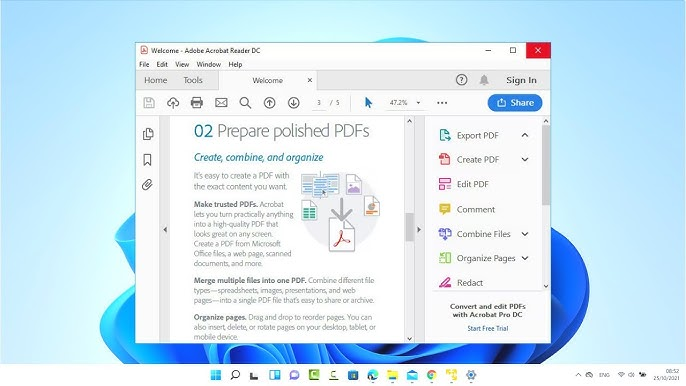
Acrobat 2021 Pro allows precise text, image, and layout adjustments. You can update fonts, resize images, reorganize content, and reflow paragraphs—without damaging the original formatting.
2. PDF Creation from Any File
Convert Word, Excel, PowerPoint, images, screenshots, or scanned documents into searchable, high-quality PDFs. This helps businesses streamline documentation and maintain a uniform format.
3. OCR Technology for Scanned Files
The built-in OCR engine turns scanned images or printed paper files into editable, searchable documents—essential for businesses digitizing records.
4. E-Signatures and Digital Certificates
Professionals handling contracts and agreements appreciate Acrobat’s secure signing features. You can add certified digital signatures to ensure authenticity and prevent document tampering.
5. File Compression Without Quality Loss
Large documents can be compressed into smaller PDFs ideal for email, cloud storage, or project submissions without compromising visual clarity.
6. Enhanced Security Tools
Password protection, redaction tools, content restriction, and encryption help safeguard confidential information.
7. Perfect Compatibility
Acrobat 2021 Pro works flawlessly with:
- Windows 10 & 11
- Microsoft Office apps
- Cloud services
- Email platforms
It fits easily into any workplace environment.
How Acrobat 2021 Pro Compares with Other Modern Tools
Professionals often use more than one productivity solution. Here’s how Acrobat complements trending tools:
✔ Google One Premium Storage For Lifetime
Professionals who manage large PDF archives often prefer Google One Premium Storage For Lifetime because it pairs perfectly with Acrobat 2021 Pro for Windows: The Complete Guide for Professionals workflows. Storing high-quality PDFs, scanned files, and project documentation becomes easier, ensuring secure backup, fast access, and smooth sharing across all devices without worrying about storage limits.
✔ Buy ChatGPT Plus for Productivity
Acrobat 2021 Pro for Windows remains a top choice for professionals who manage, edit, or secure PDF files daily. Its offline capability, one-time purchase model, and advanced tools make it ideal for business users, creators, and teams seeking reliable document workflows. Paired with modern productivity tools—such as Buy ChatGPT Plus for Productivity for faster content creation—it helps streamline tasks and improve efficiency across projects.
✔ Creative Cloud All Apps 12 Month Subscription – Private Plan (1year)
Acrobat 2021 Pro for Windows remains one of the most trusted PDF tools for professionals in 2025. Whether you’re working in design, engineering, education, or business administration, this standalone version delivers powerful features without subscription fees. Many users who rely on premium software—such as the Creative Cloud All Apps 12 Month Subscription – Private Plan (1year)—also choose Acrobat 2021 Pro to finalize, edit, secure, and optimize PDF documents with professional accuracy. Together, these tools create a seamless workflow for creating, exporting, and managing digital files across different industries.
✔ Autocad All Apps With 46 Apps | Windows & Mac
Adobe Acrobat remains the most trusted tool for managing high-quality PDFs, and Acrobat 2021 Pro for Windows continues to offer powerful capabilities for modern workflows. Whether you’re a designer, engineer, or business professional, this version delivers strong performance without recurring subscription fees. It also integrates smoothly with professional tools like Autocad All Apps With 46 Apps | WINDOWS & MAC, allowing engineers and architects to export drawings, review files, add markup, and securely share PDF-based technical documents with ease.
Who Should Use Acrobat 2021 Pro for Windows?
✔ Corporate Professionals
For handling contracts, reports, internal documents, and legal files.
✔ Designers & Creatives
To finalize portfolios, brochures, printable files, and brand documents.
✔ Educators & Students
PDFs remain the standard for assignment submissions, notes, and academic research.
✔ Engineers & Architects
Combine AutoCAD drawings with Acrobat for secure markup and sharing.
✔ Small Business Owners
Simplify invoicing, proposals, documents, and digital paperwork.
Is Acrobat 2021 Pro Worth Buying in 2025?
Absolutely. Even though cloud-based versions offer more automation, Acrobat 2021 Pro remains a strong choice because:
- It’s a lifetime solution
- It works faster and offline
- It includes all essential PDF tools
- It avoids recurring subscription costs
- It’s fully compatible with Windows 10/11
If your work depends heavily on documentation, Acrobat 2021 Pro is a long-term asset.
Expert Tips for Maximizing Acrobat 2021 Pro
1. Use Batch Processing
Automate repetitive actions like converting, renaming, compressing, or watermarking multiple files.
2. Save Custom Tools
Acrobat allows you to create a personalized toolbar—ideal for frequent workflows.
3. Use Preflight for Print Perfection
Designers preparing files for printing can ensure color profiles, bleeds, and fonts are correct.
4. Protect Sensitive Data
Use redaction to permanently remove confidential details before sharing.
5. Combine with Cloud Tools
Even though Acrobat 2021 Pro is offline-capable, uploading finished files to tools like Google One lifetime storage adds backup security.
FAQ :
1. Can Acrobat 2021 Pro run on Windows 11?
Yes, Acrobat 2021 Pro is fully compatible with both Windows 10 and Windows 11.
2. Is Acrobat 2021 Pro a subscription product?
No. Acrobat 2021 Pro is a one-time purchase and offers lifetime usability.
3. Does it support OCR for scanned documents?
Yes, Acrobat 2021 Pro includes advanced OCR to convert scans into editable, searchable PDFs.
4. Is Acrobat 2021 Pro better than online PDF editors?
Yes. It offers better accuracy, security, and advanced features not available in free online tools.
5. Can I use it with Creative Cloud or AutoCAD workflows?
Absolutely. Acrobat integrates perfectly with both Creative Cloud apps and AutoCAD export workflows.